Door & Window Takeoff: The Industry's Most Powerful Automated Quotation Solution
🔥 Core Killer Feature: Say goodbye to punching a calculator over drawings and worrying about missing hardware and auxiliary materials! Import doors and windows directly from the Measurement & Design Tool, and the system automatically breaks down door leaves, frames, glass area, and quantities of all kinds of hardware. Enter a unit price, and with one click generate a construction-grade quotation including main materials, auxiliary materials, and labor — plus direct 3D preview!
🎬 Video Tutorial (Real Screen Recording)
🎬 Full Workflow of Door & Window Estimation and 3D Preview
From importing doors and windows, breaking down hardware, generating quotations to 3D immersive walkthrough
▶ Video coming soon (YouTube link placeholder)🛠️ Core Features & Detailed Operation Steps
Feature 1: One-Click Import from Measure, Automatic Quantity Breakdown
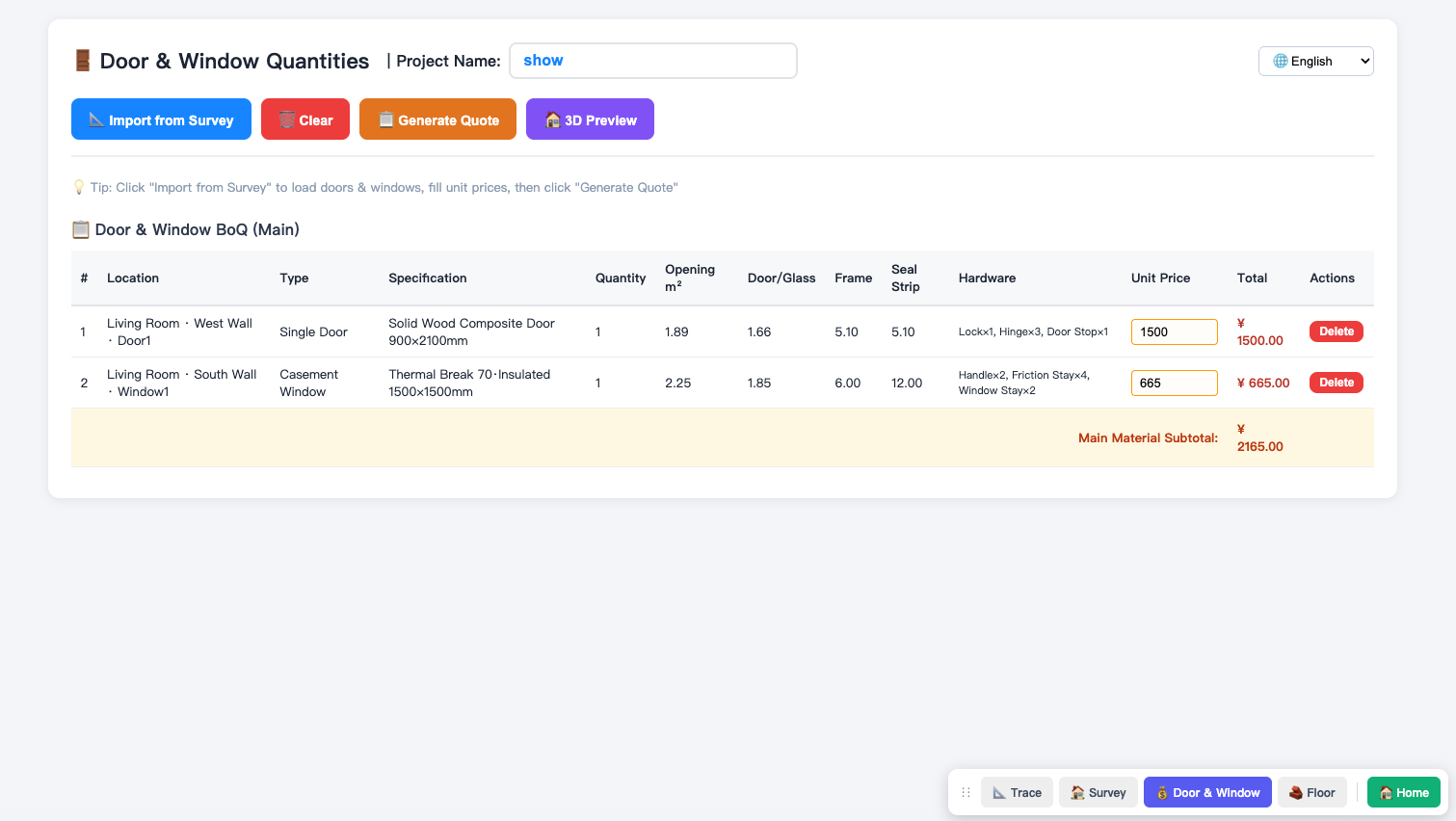
No need to manually enter door and window dimensions. After placing doors and windows in the Measurement & Design Tool, click "Import from Measurement", and the system will precisely pull in the locations of the doors and windows and automatically calculate the opening area, door leaf area, frame length, and even automatically calculate the number of hinges and friction stays corresponding to different sizes according to national standards.
- Click "Import from Measurement" at the top to load design data.
- The system automatically generates the "Door & Window Quantity Bill".
- Each row precisely lists: location, type, specifications, quantity, opening m², door leaf/glass area, frame meters, weatherstripping, and required hardware (e.g., door lock x1, hinges x3).
Feature 2: Three-in-One Super Quotation (Main Materials + Auxiliary Materials + Labor)
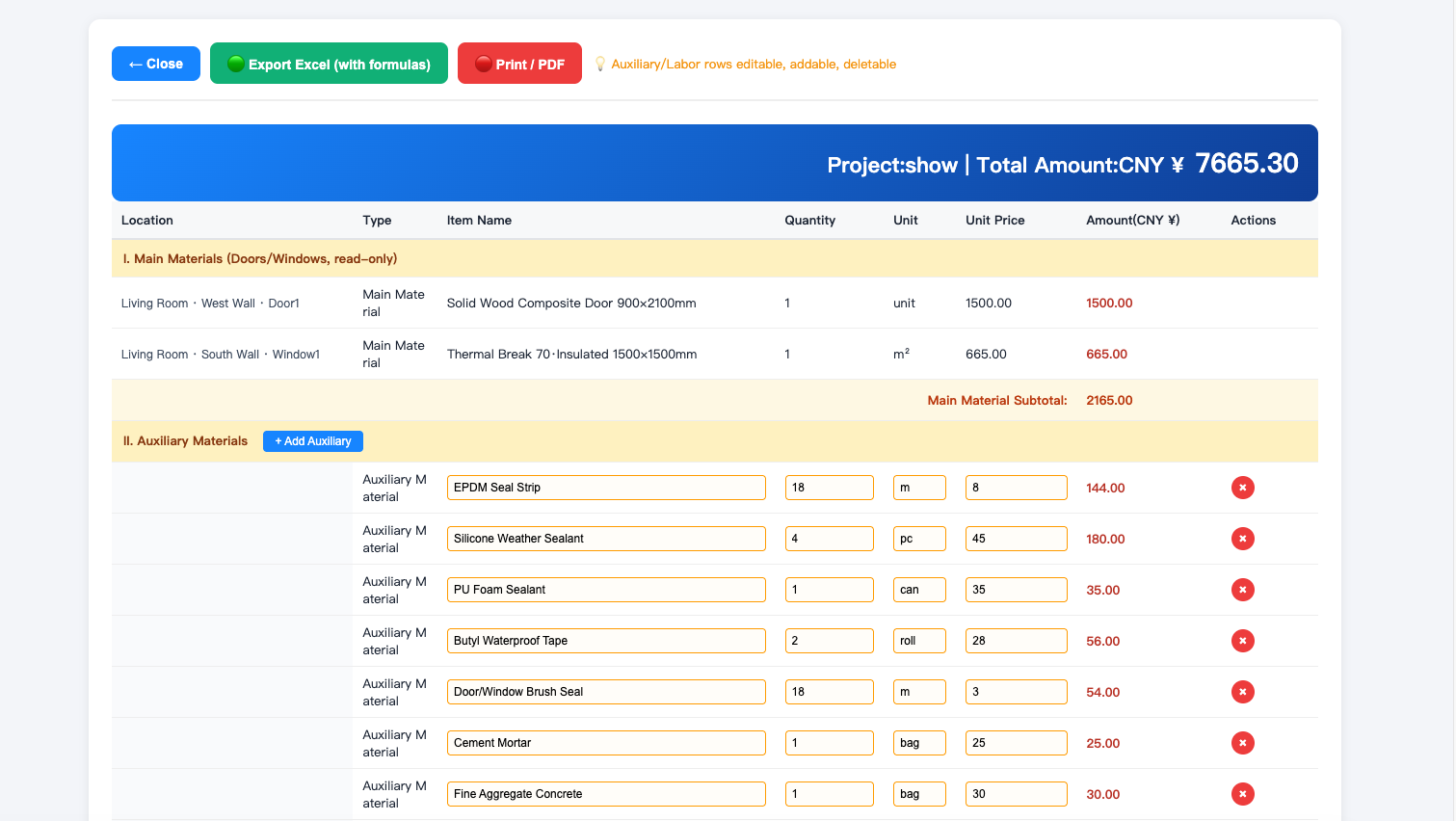
Fill in the unit price and click "Generate Quotation", and a highly professional engineering summary sheet pops up directly. The best part is that the system automatically adds default recommendations for auxiliary materials (such as foam adhesive, sealant, screws) and labor costs for you!
- Enter the 'unit price' of main materials in the list.
- Click "Generate Quotation", and the system opens a super-large table with a blue header.
- Includes three major sections: 1. Main materials list (read-only); 2. Auxiliary materials list (auto-populated, can be added, deleted, or modified); 3. Labor costs.
- The total amount is instantly summarized, supporting one-click 'Export to Excel (with formulas)' or 'Print PDF'.
Feature 3: Industry First - Door & Window 3D Room Preview
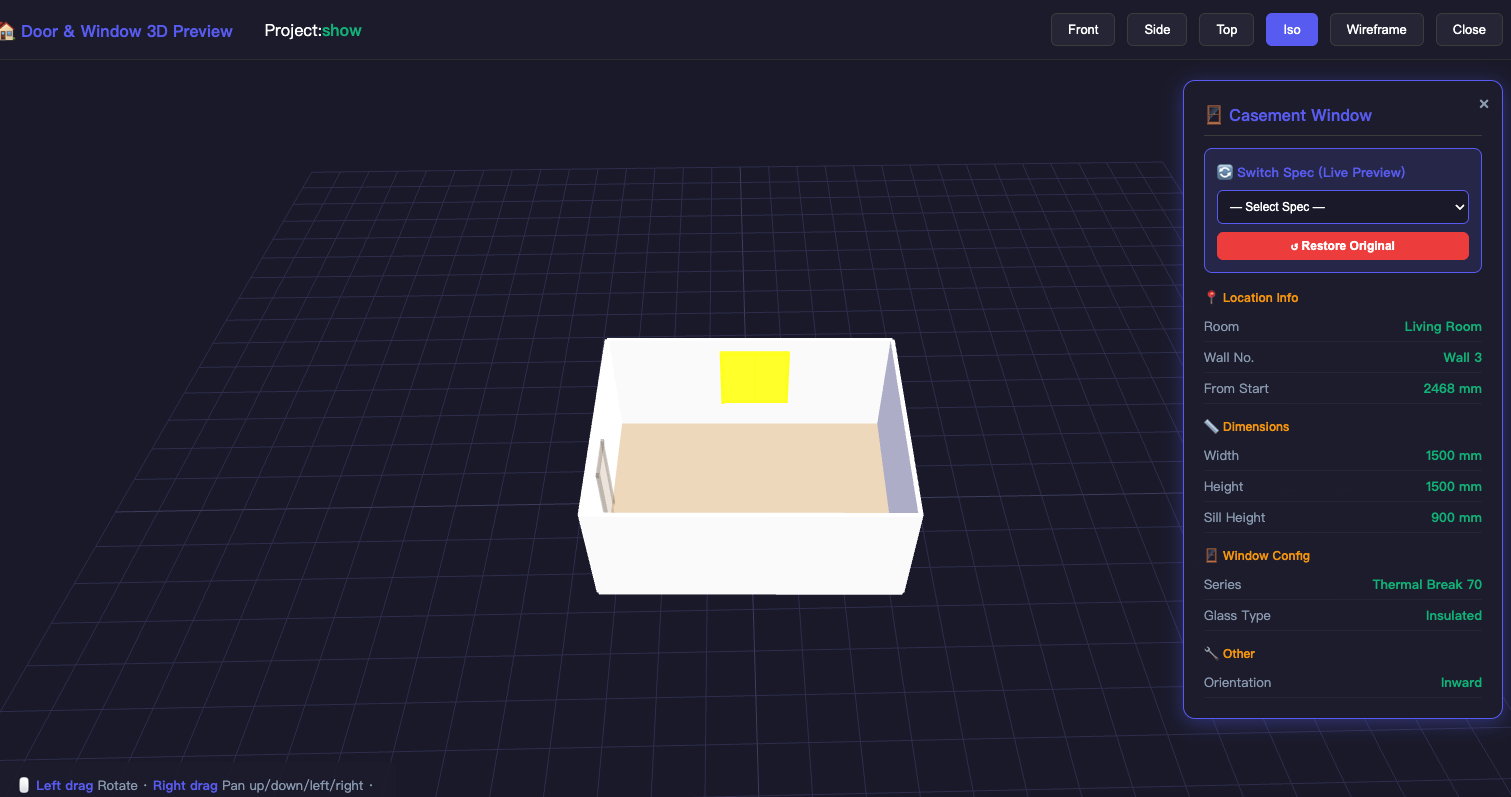
Numbers alone aren't intuitive enough? Just click the '3D Preview' button. The system will instantly generate a 3D room scene based on your floor plan and door/window positions, letting you max out the wow factor in front of clients.
- Click the purple "3D Preview" button on the main interface.
- Supports left-click drag to rotate, right-click to pan, and scroll wheel to zoom.
- The top provides one-click switching among multiple views such as 'Front, Side, Top, and Isometric', and you can also enable wireframe mode.
- Click on a door or window in the 3D scene to directly view its detailed dimensions and configuration.
Feature 4: Seamless Multilingual Collaboration (10 Languages)
The system has a built-in 10-language switcher in the upper right corner. If you export building materials for foreign trade, simply switch to English, Russian, or Spanish, and even the engineering list and generated quotation will change to the corresponding language, making it effortless to send to foreign clients.
📌 FAQ & Pitfall Avoidance Guide
Ready to estimate a villa's doors and windows in 10 minutes?
Say goodbye to manual material calculation — even the most complex doors and windows can generate quotations and 3D effects with one click.
Start using door and window estimation for free now →